
Last tested in The Sims 4: August 2026
The Sims 4 relationship cheats let you instantly increase or decrease friendship and romance between two Sims. You can also change relationships with pets and use additional cheats for things like Family Dynamics. Enable cheats first with testingcheats true, then use the codes below.
The Sims 4 Relationship Cheats
The bases of all these cheats are using 100 or -100 in them but you can use these as any number from -100 to 100 so -50 is allowed or 48 is also allowed, depending on how many friendship points you’d like to add or subtract.
| Cheat | Cheat Code |
|---|---|
| Increases Relationship | ModifyRelationship Sim1 Sim2 100 LTR_Friendship_Main |
| Decreases Relationship | ModifyRelationship Sim1 Sim2 -100 LTR_Friendship_Main |
| Increases Romantic Relationship | ModifyRelationship Sim1 Sim2 100 LTR_Romance_Main |
| Decreases Romantic Relationship | ModifyRelationship Sim1 Sim2 -100 LTR_Romance_Main |
| Increases Pet Relationship | ModifyRelationship SimName PetName 100 LTR_SimtoPet_Friendship_Main |
| Decreases Pet Relationship | ModifyRelationship SimName PetName -100 LTR_SimtoPet_Friendship_Main |
How to Enable Cheats in The Sims 4
Before you can use most relationship cheats in The Sims 4, you’ll want to enable cheats in your game. Open the cheat box using the controls for your platform:
- PC: Ctrl + Shift + C
- Mac: Command + Shift + C
- PlayStation: L1 + L2 + R1 + R2
- Xbox: LB + LT + RB + RT
Once the cheat box is open you’ll enter testingcheats true and press enter or confirm on your controller. You can now enter the relationship cheats above into the same cheat box.
How to Use Individual Sims 4 Relationship Cheats
There are three types of relationships that your sims can use and each of them has a different cheat code but they all operate in the same way. The way that relationship cheats work is that there is a point system with 100 points in the positive and 100 points in the negative.
If you start with an entire neutral relationship and fill the amount with 50 positive points you’ll end up with half of a full friendship bar in the game. If you use -50 points you’ll have a half full negative friendship bar.
If you start with -50 friendship points and want to have a perfectly full relationship bar you’ll need to change the number to 150 to gain those 50 points back to get to neutral plus the 100 points to make it full.
Sims 4 Friendship Cheats
If you are trying to increase the friendship between two sims you are going to use this cheat:
- ModifyRelationship Sim1 Sim2 Amount LTR_Friendship_Main
I totally understand that a cheat like that can be confusing so let’s do an example. If you wanted to increase Bob and Eliza Pancakes’s friendship by 100 points the cheat is going to look like this:
- ModifyRelationship Bob Pancakes Eliza Pancakes 100 LTR_Friendship_Main

The first sim name is going to be the name of the sim you are currently controlling and you need the first and last name with a space in between. Make sure that you spell them correctly! Then, the number is the amount of relationship you’d wish to give this can be any number from 1 to 100.
These cheats work on a points system so if you fill the number with 100 it will add 100 friendship points, not fill the bar too 100%.
To decrease your friendship with another sim you are going to use the exact same cheat but you are going to change the number from a positive number to a negative. So, for example if you wanted to decrease by 50 relationship points for Bob and Eliza Pancakes you would have a cheat that looks like this:
- ModifyRelationship Bob Pancakes Eliza Pancakes -50 LTR_Friendship_Main

Sims 4 Romance Cheats
The romance cheats are going to work exactly the same as the friendship cheat, except in the cheat you are going to change friendship to romance. It will look something like this:
- ModifyRelationship Sim1 Sim2 Amount LTR_Romance_Main
If you wanted to increase the relationship by 50 for Bob and Eliza Pancakes you would have a cheat that looks like this:
- ModifyRelationship Bob Pancakes Eliza Pancakes 50 LTR_Romance_Main

You can also use this to decrease romance by whatever amount by changing the number to be a negative number instead.

Sims 4 Pet Relationships Cheats
If you have The Sims 4: Cats & Dogs installed in your game you have the option to cheat relationships between sims and pets. This works pretty much the same as with adults and is really easy to use.
- ModifyRelationship SimName PetName Amount LTR_SimtoPet_Friendship_Main

You want to fill the Sim name with the name of the sim you are currently controlling and the pet name is the name of your pet. Just like the sim to sim cheats the amount is how many points you wish to add to your relationship. Here’s an example of Bob Pancakes becoming friends with a dog that Eliza decided to adopt named Prissy.
- ModifyRelationship Bob Pancakes Prissy 100 LTR_SimtoPet_Friendship_Main
Just like with the sim cheats you are also able to use these to decrease relationships by changing the number to a negative number, so -100 or -50 instead.

Create A Friend Instantly In The Sims 4
Sometimes it can be very difficult for you to find sims to be friends with and just want to create a sim out of the blue to be your sim’s friend. You can use this cheat to make that happen so easily! First you’ll want to make sure that your cheats are enabled and the cheat box is open.
Then you’ll want to type in relationships.create_friends_for_sim and hit enter.

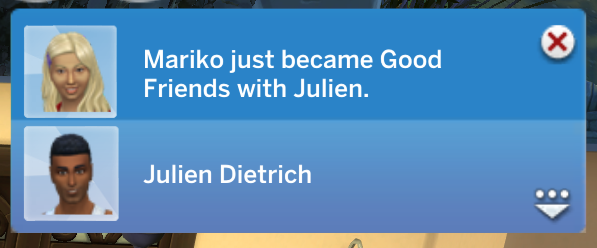
When you do this a sim will immediately spawn at the entrance to your lot and you’ll get a notification saying that your sim just became good friends with this other sim and they will now be in your relationship panel. Immediate best friends!
How to Cheat Family Dynamics
With The Sims 4: Growing Together you can have your sims have family dynamics like close or distant. You can use text cheats with these but they require you to look up your sim’s sim ID which is a pain.
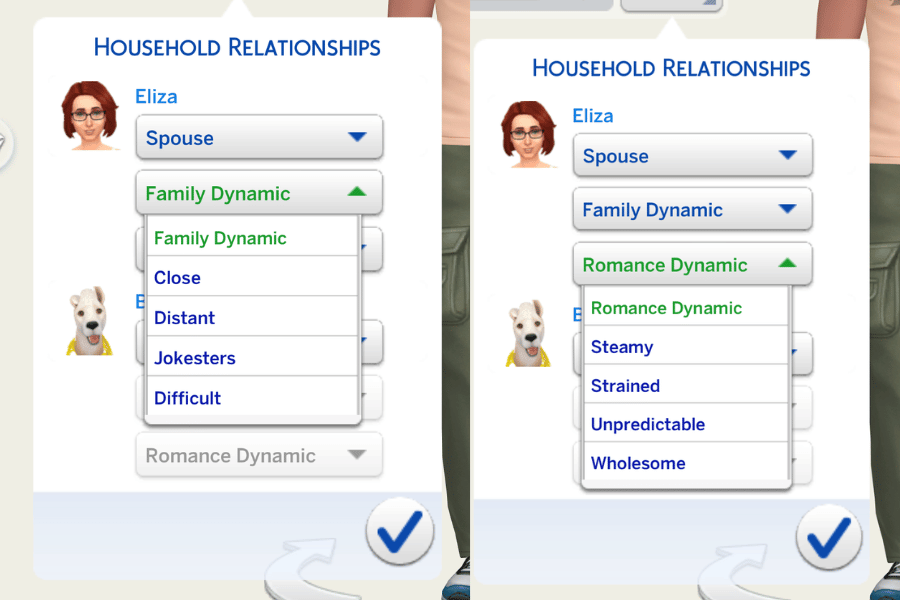
To cheat these without using a sim ID you can use the cas.fulleditmode cheat so you can go into create a sim and under the relationships drop down you can change the dynamics with ease.
Why Are My Relationship Cheats Not Working?
Relationship cheats still work in The Sims 4, but they are some of the easiest cheats to type incorrectly because they include multiple Sim names, a number, and a relationship type all in one command. If your cheats aren’t working, try these fixes:
Make Sure Cheats Are Enabled
Open the cheat box and enter testingcheats true and hit enter. Then try entering the cheat again. If cheats are not enabled you may see random cheats not working.
Double Check Both Sims’ Names
The most common problem people encounter is that they spelled a name incorrectly. For a Sim named Bob Pancakes, you need to enter both their first and last name with a space in between. A working friendship cheat would look like this for the Pancakes’ family:
modifyrelationship Bob Pancakes Eliza Pancakes 100 LTR_Friendship_Main
Check the Order of the Cheat
Next, check your cheat is in the correct order! The cheat should follow this order modifyrelationship Sim1 Sim2 Amount RelationshipType always. You’ll use a different relationship type for each cheat. For friendship it’s LTR_Friendship_Main, for romance it’s LTR_Romance_Main and for pets its LTR_SimtoPet_Friendship_Main.
Use a Negative Number to Remove Relationship Points
If you want two Sims to dislike each other, the number needs a minus sign. For example, you could use modifyrelationship Bob Pancakes Eliza Pancakes -100 LTR_Friendship_Main to have Bob and Eliza like each other even less. If you remove the minus sign, the relationship increases.
Be Careful With Unusual Sim Names
Relationship cheats can become more complicated when Sims have unusual names, multiple-part names, or missing last names. For example, the cheat doesn’t work on J Huntington III because he has three names.
If the standard version of the cheat works with other Sims but not one particular Sim, the name is usually the first thing worth checking.
Make Sure You Have the Required Pack
If you want to use the pet cheats, you need to have a pet pack like Cats & Dogs or Horse Ranch. To use the family dynamic cheats you’ll need to have Growing Together installed.
Check Your Mods
Outdated mods can cause strange behaviour after a Sims 4 update. If a cheat suddenly stops working after a game patch, update your mods first. If necessary, temporarily remove mods and test the cheat again in an unmodded save.
Update The Sims 4
Finally, make sure your copy of The Sims 4 is fully updated. Relationship cheats are built into the game, so if the syntax is correct and your game is current, the regular friendship and romance cheats should work.
Final Thoughts on Sims 4 Relationship Cheats
There are so many cheats that I use every single time I play The Sims 4 and these are on that list. These sims 4 relationship cheats are must-haves for me and they make my gameplay so much more interesting. Don’t forget to bookmark this page to make sure that you always have access to these cheats or go ahead and download one of the best cheat mods so you can get these easier. Happy Playing!